Video Demos
each feature.
Explore our user-friendly but robust facility maintenance software. See how Maintenance Care can make your workday easier with real-life, facility manager-approved features.
Maintenance Care specializes in providing an easy to use Computerized Maintenance Management Software (CMMS) for a wide range of industries.
Lorem ipsum dolor sit amet, consectetur adipiscing elit, sed do eiusmod tempor incididunt ut labore et dolore magna aliqua. Ut enim ad minim veniam, quis nostrud exercitation ullamco laboris nis.
Create, assign, prioritize and track maintenance work orders from one easy-to-use system. Maintenance Care helps your team manage work requests, stay organized and get more done—with free work order software available through our Free Forever plan.
Work order management software is a digital system that helps maintenance teams create, assign, prioritize, track and complete maintenance work orders. Instead of relying on paper forms, spreadsheets, emails or verbal requests, all maintenance requests and work order information are organized in one central system.
Maintenance Care makes work order management simple. Staff can submit maintenance requests, managers can assign and prioritize work, and maintenance technicians can receive notifications, update tasks and record completed work from anywhere. This gives your team a clear view of what needs to be done, what is in progress and what has been completed.
Clear, Direct Maintenance Request Forms
Make it easy for staff, tenants or other facility users to submit maintenance requests and turn them into organized work orders. Maintenance Care captures request details in one central system, giving your maintenance team the information they need to prioritize, assign and complete work while helping prevent duplicate requests.
Customizable Maintenance Request Forms: Create web forms tailored to your facility so requesters provide the information your maintenance team needs before a technician is assigned.
Submit Requests from Any Device: Allow staff, tenants and other users to submit maintenance requests from a desktop computer, tablet, mobile device or digital kiosk.
Instant Digital Work Requests: Send new requests directly into Maintenance Care so your team can review, prioritize and assign incoming maintenance work without relying on paper forms, emails or verbal requests.
Clear Communication & Request Tracking: Keep maintenance requests organized from submission through completion, improving communication between your maintenance team and the people requesting the work.
Full Visibility Over Work Orders, Assignments & Schedules
Track every maintenance work order from one organized dashboard. Maintenance Care gives your team a clear view of incoming requests, assigned work, priorities, due dates and task status from initial submission through completion. Quickly see what needs attention, who is responsible and where each work order stands.
Filter & Sort Work Orders: Quickly find active work orders by technician, priority, status, facility or location so your team can focus on the maintenance tasks that need attention first.
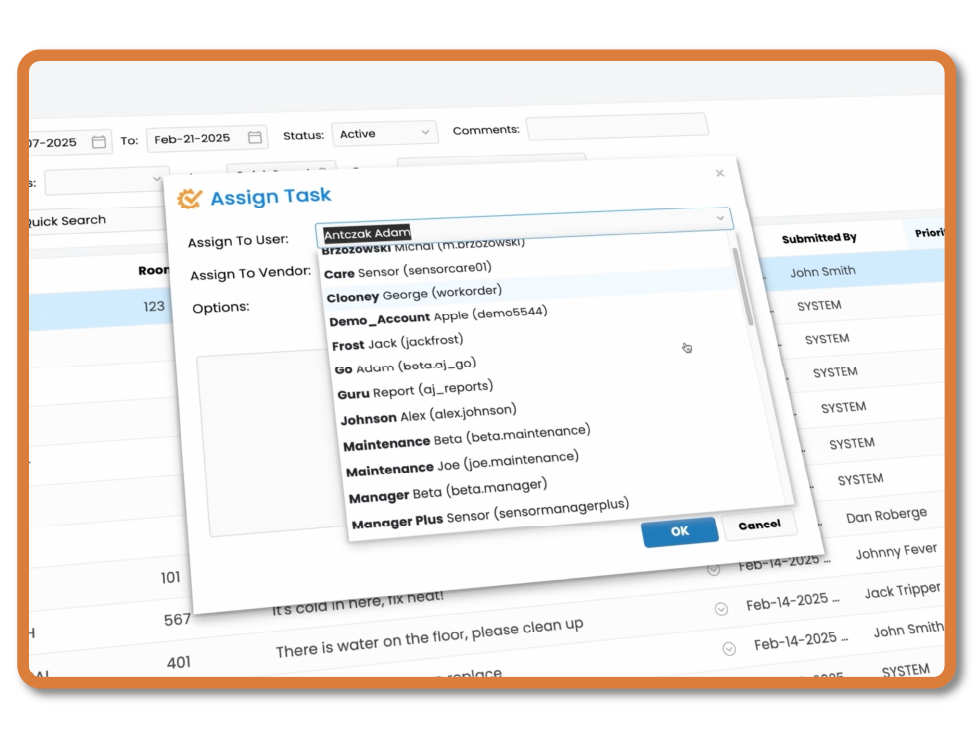
Assign Work to Technicians: Assign work orders directly to specific team members so technicians know what they are responsible for and managers can easily see who is handling each task.
Manage Workloads & Schedules: Identify past-due work orders, balance assignments across your maintenance team and coordinate reactive repairs alongside scheduled preventive maintenance.
Track Work Order Status: Follow work orders through each stage of the maintenance process, including active work, tasks waiting on parts and completed jobs, so your maintenance records stay accurate and up to date.
Practical Search Tools, Exports & Flexible Work Order Formats
Finding the right maintenance record should be quick and easy. Maintenance Care keeps current and historical work orders organized in one place, with search, filtering, printing and export tools that help your team find information, review completed work and share maintenance records when needed.
Search & Filter Work Orders: Find current or historical work orders using keywords, dates, assets, technicians and other work order details, making it easy to locate the maintenance information you need.
Print Work Orders: Print clear, easy-to-read work orders when your team needs a physical copy for technicians, vendors, contractors or facility records.
Export Work Order Data: Download work order information for reporting, management reviews, maintenance planning or further analysis of your facility’s work order history.
Free Work Order Software: Get essential work order tracking and organization tools with Maintenance Care’s Free Forever plan, giving maintenance teams an easy way to manage work orders without an upfront software cost.
Keep Technicians and Requesters Updated Instantly
Reduce phone calls, emails and follow-ups asking about the status of maintenance requests. Maintenance Care automatically sends work order notifications to technicians and requesters, helping your team respond faster while keeping staff, tenants and other facility users informed as work progresses.
Instant Technician Alerts: Automatically notify technicians when a work order is assigned or when important task details change, helping your maintenance team respond quickly to new and urgent requests.
Automatic Work Order Status Updates: Keep requesters informed as maintenance work progresses with automatic updates when their request changes status or is completed.
Mobile App Notifications: Send work order updates directly to your maintenance team’s mobile devices so technicians can stay informed while working throughout the facility.
Customizable Notification Triggers: Control when work order notifications are sent based on changes to assignments, priority or status, helping your team stay informed without unnecessary alerts.
Keep Communication History With Every Work Order
Keep conversations about maintenance work connected directly to the appropriate work order. Maintenance Care’s built-in email tools let your team communicate with requesters, staff, vendors and contractors while keeping replies and important details together with the work order history.
Reply-to-Work-Order Tracking: Requesters can reply directly to work order email notifications from their regular inbox, helping keep responses connected to the appropriate maintenance request.
Automatic Communication History: Keep incoming email responses associated with the work order so technicians and managers can review previous communication without searching through separate email threads.
Vendor & Contractor Communication: Communicate with external vendors and contractors about maintenance work while keeping important updates and correspondence connected to the work order.
Centralized Maintenance Communication: Keep work order details and related communication together in one system, giving your maintenance team a more complete record of each repair or request.
Prevent Duplicate Work Orders & Keep Your Maintenance Queue Organized
When multiple people report the same maintenance problem, duplicate work orders can waste technician time and make maintenance records harder to manage. Maintenance Care helps identify possible duplicate requests before they are submitted, helping your team avoid unnecessary work and keep work order records organized.
Duplicate Work Order Alerts: Alert requesters when a similar maintenance request may already exist, helping prevent the same problem from being submitted multiple times.
Reduce Duplicate Maintenance Tasks: Help technicians avoid being assigned multiple work orders for the same equipment problem, repair or facility issue.
Keep Work Order Records Organized: Reducing duplicate requests helps keep your work order history cleaner and makes it easier to understand what maintenance was actually performed.
Improve Maintenance Data Accuracy: Cleaner work order records provide more reliable maintenance history for reporting, asset costs and future maintenance decisions.
Maintenance Care has been helping maintenance teams manage work orders for over 20 years. Work order management is at the core of our CMMS, connecting maintenance requests with preventive maintenance, assets, parts, reporting and other facility maintenance activities. Below, we answer some of the most common questions about work order software, how it works, what features to look for and how it can help your maintenance team stay organized.
Work order software is a digital system used to create, assign, prioritize, track and complete maintenance work orders. It gives maintenance teams one central place to manage incoming requests, assign work to technicians, monitor task status and maintain a history of completed repairs.
With Maintenance Care, staff or facility users can submit maintenance requests from any web-enabled device. Maintenance teams can then review requests, assign technicians, track progress, communicate with requesters and document completed work. Work order records are stored within the CMMS, making maintenance history easy to access for future reference, reporting and planning.
Work order software should make it easy to submit maintenance requests, assign work to technicians, prioritize tasks, track progress and document completed work. Useful features include online request forms, mobile access, technician assignments, work order status tracking, automatic notifications, search and filtering tools, communication history and maintenance reporting.
Maintenance Care brings these tools together in one system and also includes features such as duplicate work order detection, email tracking and mobile work order management. This helps maintenance teams stay organized, respond to requests faster and maintain an accurate history of maintenance work.
Work order software manages the maintenance process from the initial request through completion. A staff member, tenant or other facility user submits a maintenance request, which is recorded in the system and can then be reviewed, prioritized and assigned to the appropriate technician.
The maintenance team can track the work order as it progresses, receive notifications, add notes and communicate with requesters. Once the work is completed, the technician can update the status and record the work performed. Maintenance Care keeps this information together as part of the work order history, giving your team an organized record of maintenance activity for future reference and reporting.
Work order management software helps maintenance teams stay organized, respond to requests faster and spend less time managing paperwork. Digital work orders make it easier to prioritize tasks, assign technicians, track progress and keep requesters informed while giving managers better visibility into their team’s maintenance workload.
By replacing paper forms, spreadsheets and disconnected communication, Maintenance Care helps reduce missed requests, duplicate work and time spent searching for maintenance information. Teams can start with our Free Forever work order software or upgrade to a more complete CMMS as their maintenance needs grow.
Yes. Maintenance Care offers free work order software through our Free Forever plan, giving maintenance teams a simple way to manage work orders without an upfront software cost. Teams can submit maintenance requests, organize work orders and track maintenance tasks digitally instead of relying on paper forms or spreadsheets.
The Free Forever plan is a good way for smaller maintenance teams to get started with digital work order management. As your needs grow, Maintenance Care also offers paid CMMS plans with additional tools for preventive maintenance, asset management, parts inventory, reporting and other facility maintenance operations.
This is an important FAQ for us. It gives “Is there free work order software?” a direct “Yes” immediately, connects it specifically to Maintenance Care, and then naturally introduces the broader CMMS without turning the answer into a sales pitch.
Maintenance Care offers a Free Forever plan, allowing maintenance teams to get started with digital work order management at no cost. The free version includes essential work order tools, while paid Maintenance Care plans provide additional features and capabilities for organizations with more advanced maintenance needs.
Upgraded plans can include additional CMMS capabilities such as preventive maintenance, asset management, parts inventory, reporting and expanded user access. This allows organizations to start with free work order software and move to a more comprehensive maintenance management system as their team, facilities and maintenance requirements grow.
Experience the power of Maintenance Care first-hand by getting a demo or trying our FREE forever software.
Maintenance Care's computerized maintenance management system is powerful, user-friendly, and highly efficient. It allows you to access all your maintenance work easily from wherever you are and at any time.
With our full-featured, comprehensive CMMS maintenance program, you and your team can easily manage work orders, preventive maintenance scheduling and asset tracking in your facility from your desktop or mobile device.
© 2026 Maintenance Care | ALL RIGHTS RESERVED