CMMS SOLUTIONS

Your Work Order
Management Software.

Set up an effective workflow for managing incoming task requests through your facilities management system.

WorkOrders-Hero

What exactly is a Work Order Software

At its core, work order software, often called a CMMS (Computerized Maintenance Management System), is a digital command center designed to bring order to facility maintenance. This system gives you a streamlined way to accept incoming repair requests, assign those tasks directly to your technicians, and track the progress of every job in real time from any desktop or mobile device. By centralizing your reactive repairs and preventive maintenance into one intuitive tracker, the software does more than just organize your day, it builds team accountability and captures a permanent history of parts and labor for every asset in your building. Ultimately, it gives you the peace of mind needed to run a smooth, predictable facility.

Create Work Orders Easily


Clear, Direct Maintenance Request Forms

Simplify how your facility captures and tracks maintenance tasks. Maintenance Care provides a straightforward way for staff or tenants to submit requests, helping your maintenance team receive details instantly and prevent duplicate tickets from creating confusion.

  • Customizable Request Forms: Set up web forms tailored to your facility so users provide the exact details your technicians need before they head to the job.
  • Multi-Device Access: Allow team members to log requests from any web-enabled device, whether they are using a desktop computer in the office or a mobile tablet out in the field.
  • Instant Digital Intake: Requesters can submit tasks using desktop computers, mobile tablets, digital kiosks, or any web-enabled device to ensure nothing is missed.
  • Clear Departmental Communication: Keep incoming requests organized right from the start, improving transparency between your maintenance team and the rest of your facility.

Work Order Dashboard


Full Visibility Over Tasks, Assignments, and Schedules

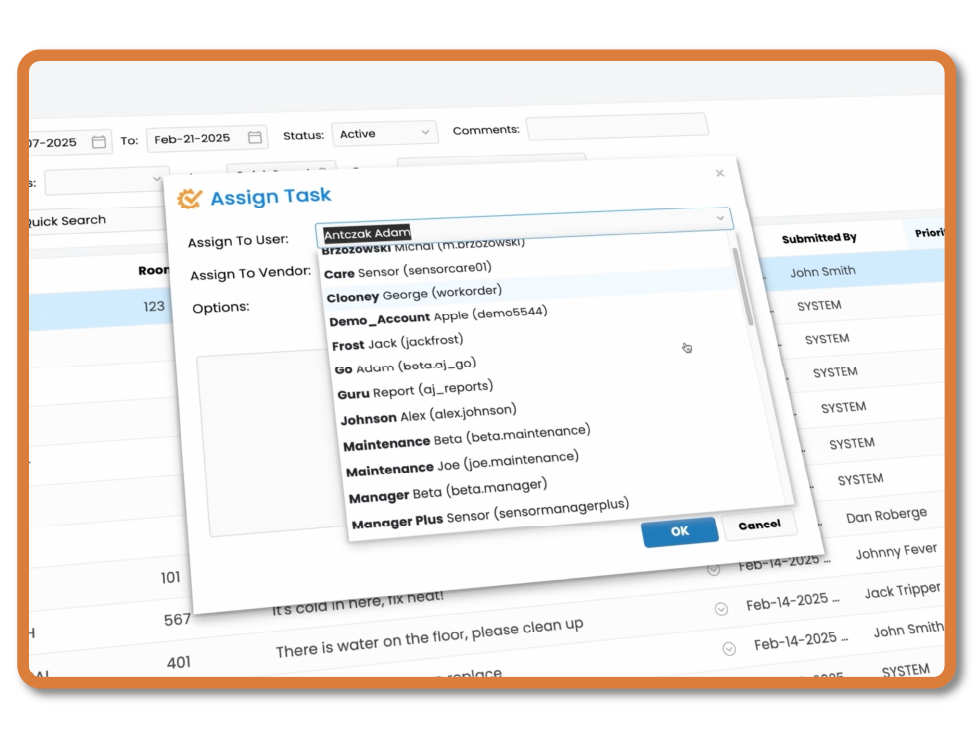
Track the progress of every maintenance task from a single, organized dashboard. Maintenance Care lets you monitor the lifecycle of a work order from the initial submission until the technician marks the job as complete.

  • Filter and Sort Tools: Quickly view your active tasks by specific technician, priority level, status, or location to focus on what needs immediate attention.
  • Direct Technician Assignment: Assign tasks to specific team members with a few clicks, making sure everyone knows their responsibilities for the day.
  • Workload and Scheduling: View past-due tasks, balance work across your team, and coordinate reactive repairs alongside your preventive maintenance schedule.
  • Clear Status Updates: Move tasks through logical steps—whether a job is active, waiting on parts, or ready for final review—so your records stay accurate.

Keep Your Work Orders Organized


Practical Search Tools, Exports, and Flexible Formatting

Finding specific maintenance records should not slow you down. Maintenance Care includes simple sorting and filtering tools that help you locate historical data instantly, run smoother meetings, and hand clear instructions to your team or external contractors.

  • Quick Search and Filters: Find any past or present work order by searching for specific keywords, dates, asset types, or individual technicians.
  • Print Physical Work Orders: For facilities that rely on paper backups or need to hand physical sheets to vendors, you can print clean, easy-to-read hard copies of any work order.
  • Data Downloads and Exporting: Easily download your work order data into standard formats to create reports, share updates with management, or review facility history.
  • Free Forever Work Order Software: Access these essential tracking and organization features at no cost through our foundational software tier, built to help smaller teams get organized without budget strain.

Automate Work Order Notifications


Keep Technicians and Requesters Updated Instantly

Eliminate constant phone calls and text messages checking on the status of a repair. Maintenance Care handles notifications automatically, ensuring your technicians know about urgent tasks immediately and your facility users stay informed from start to finish.

  • Instant Technician Alerts: Automatically notify technicians via email or app alerts the moment a work order is assigned to them or changed to a high priority.
  • Automatic Status Updates: Keep tenants, staff, or department heads in the loop. The system automatically sends updates when their request is approved, in progress, or completed.
  • Mobile App Push Notifications: Deliver critical updates directly to your team's smartphones or tablets out on the facility floor, minimizing delayed responses.
  • Customizable Alert Triggers: Define which changes in priority or status trigger an automatic alert, keeping your team focused without unnecessary noise.

Built-In Work Order Email Tracking


Centralize Communication History Within Every Work Order

Keep all conversations regarding a specific repair tied directly to that task's permanent history. Our built-in email features allow external users or tenants to respond directly to notifications, pulling their replies back into the system notes automatically.

  • Reply-to-Work-Order Tracking: Requesters can reply directly to the system's email notifications using their preferred inbox, and Maintenance Care captures their responses.
  • Automatic Notes Logging: Incoming email replies are automatically attached straight to the correct work order history, removing the need for manual copy-pasting.
  • Vendor Correspondence: Email external contractors or vendors directly from the work order itself, ensuring their quotes, updates, and timelines are fully documented.
  • Reduced Inbox Clutter: Consolidate your facility’s maintenance communication into one software system rather than letting important details get lost in personal email threads.

Automated Duplicate Detection


Prevent Double-Entry and Keep Your Maintenance Queue Clean

When multiple people notice the same broken asset, it often leads to duplicate work orders. Maintenance Care automatically flags similar requests before they get assigned, saving your team from wasted trips and keeping your dashboard organized.

  • Real-Time Duplication Alerts: The system automatically scans incoming titles, descriptions, and locations, alerting you instantly if a similar work order already exists.
  • Protect Technician Time: Prevent your maintenance team from driving out to inspect the same HVAC unit, lighting fixture, or plumbing leak twice for separate tickets.
  • Consolidate Related Tasks: Merge or link duplicate requests together so you can update all re-questers at once when the job is completed.
  • Clean Historical Data: Avoid inflating your repair metrics with double-entries, ensuring your maintenance history reports and asset costs remain accurate.

Work Order FAQ’s

We have been providing work order management software for over 20 years and the very foundation of the entire system was built on the work order process. So much so that most of the elements within Maintenance Care, such as preventive maintenance and asset management, tie in to work orders in some way or another. Task management is what we know and our system will help you get organized. We optimize your operations and provide expert guidance on utilizing our work order software, making it essential for your needs!

What Is Work Order Software?

Work order software is a feature built into your CMMS that allows you to manage incoming task requests. Whether you're handling property management or directing day-to-day operations, you can use this system to easily send and receive instant work orders and other maintenance requests, as well as streamline your daily activities. All documentation can then be stored in your CMMS for easy accessibility by the rest of the maintenance team.

What Features Does Work Order Software Include?

Work order software offers a variety of different features to help your team succeed. Capabilities include instant online request forms, mobile work order management, maintenance lists, instant notifications and email capabilities. Maintenance Care’s work order software also includes a duplicate task checker so the same work requests aren't submitted multiple times. You can access and manage all work orders via the Maintenance Care app.

How Does Work Order Software Work?

Work requests are part of Maintenance Care’s larger CMMS software. This feature allows users to send and receive instant online work order requests that detail everything your team needs to know about a particular job or repair. It also allows your team to receive instant notifications and identify which tasks are pending and which have been completed in one convenient place, so maintenance scheduling is easier and more convenient.

How Will Work Order Software Help My Team?

Work order software will simplify your team’s day-to-day activities. Whether you’re using our Free Forever version specifically built for digital work orders or our more robust, upgraded CMMS plans, your employees will no longer have to rely on manual forms to complete tasks. Best of all, team members will be more productive when they don’t have to waste time picking up, dropping off or cataloging manual work orders. Maintenance scheduling is simplified with maintenance software for work requests.

What Other Benefits Does Work Order Software Provide?

Because work order software provides quick and easy access to all maintenance tasks, from complete to pending, new and rejected, no facility management task will go unnoticed. Maintenance managers will also be able to track all information surrounding each work order request with the ability to email clients and send and receive texts. Everything you need is in one, easy-to-navigate location to improve efficiency, speed up your day and receive notifications on the fly. Additionally, Maintenance Care offers features for asset management, preventive maintenance tasks and much more.

How Much Does Work Order Software Cost?

Maintenance Care’s basic work order software is completely free. However, not all work order features are available with the Free Forever plan, such as inventory and asset management and unlimited users. To experience the full benefits of the software, we recommend trying our Work Order or Enterprise Editions. These upgraded plans give you a larger range of features to help you streamline and improve your maintenance operations, whether you’re in property management, own a small business or oversee a large chain of facilities with numerous maintenance managers.

Ready to Optimize
Your Maintenance Operations?

Experience the power of Maintenance Care first-hand by getting a demo or trying our FREE forever software.